External Mailboxes
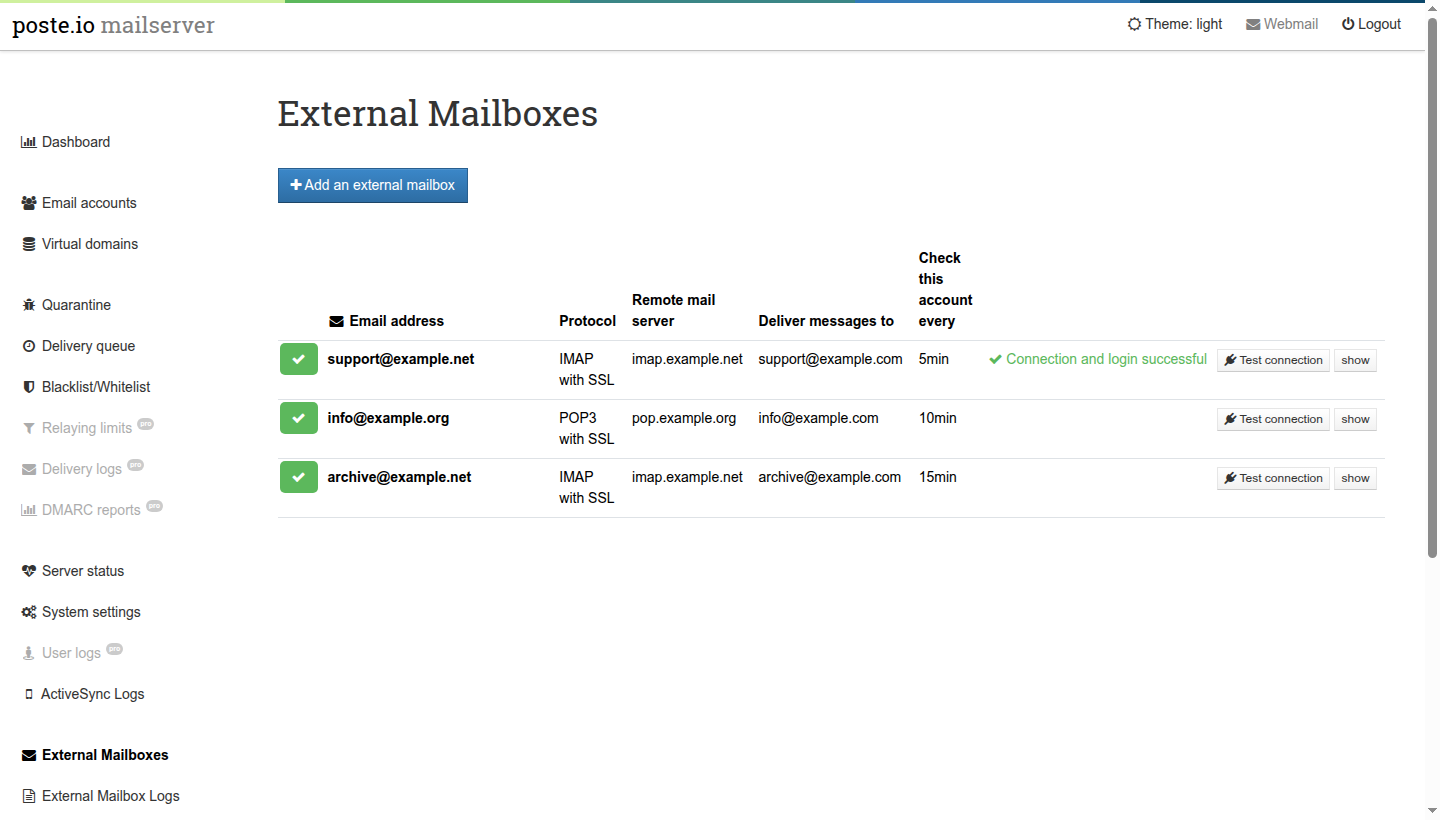
Fetches mail from mailboxes hosted elsewhere (POP3 or IMAP, with or without SSL) and delivers it into Poste.io, on a schedule, with getmail6. Everything is configured from the Poste.io admin (super admins only): External Mailboxes and External Mailbox Logs in the left menu.
What it does
- Protocols: POP3, POP3 over SSL, IMAP, IMAP over SSL.
- Schedule: every 5, 10, 15, 30 or 60 minutes, or disabled.
- Delivery: to any local mailbox or redirect (alias). Delivery goes
through Poste.io itself (
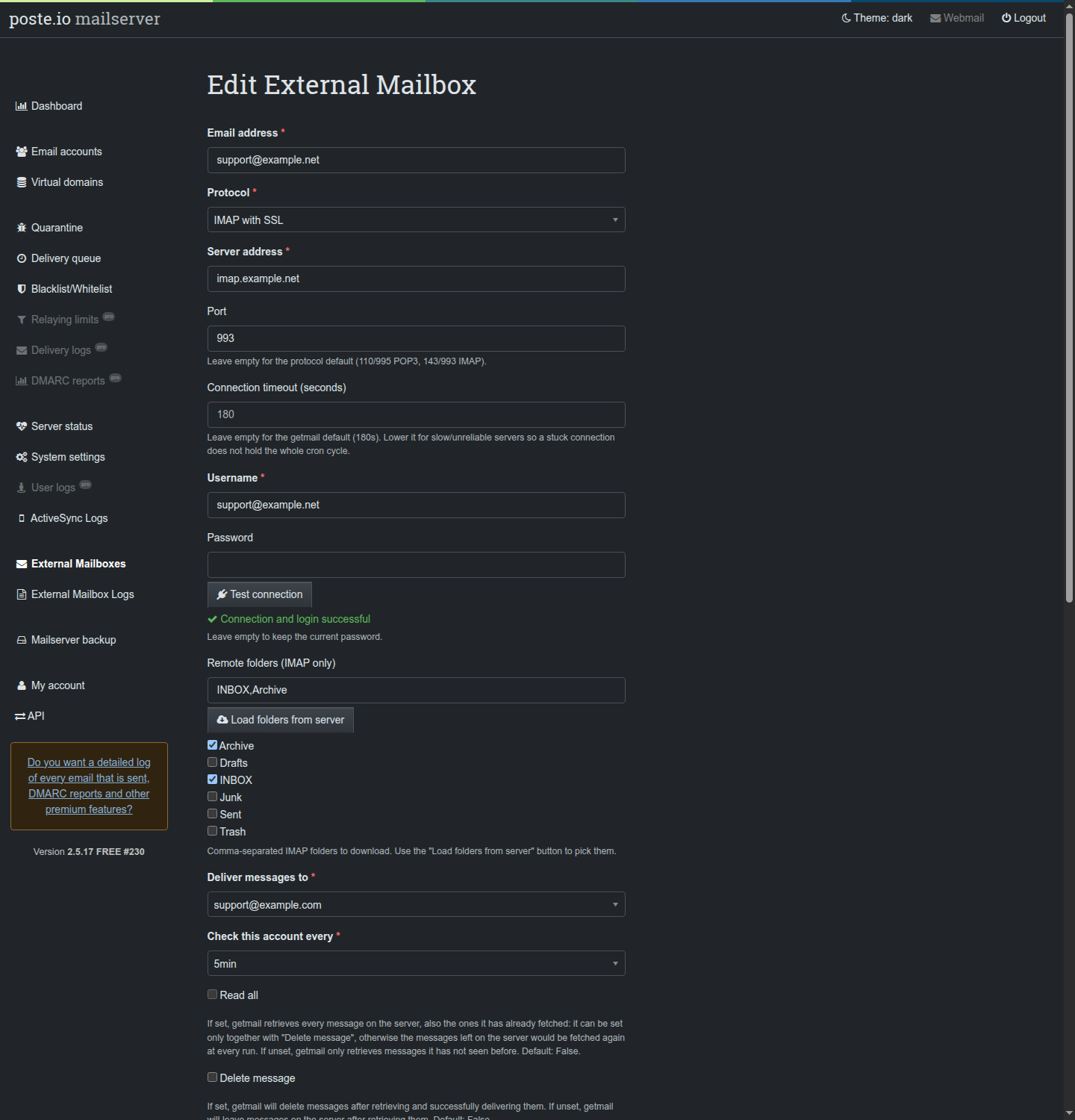
sendmail→ Haraka, inside the container), so filters and redirects apply: deliver an externalsupport@mailbox to a local redirect and every member of the redirect gets a copy. In the destination menu redirects are shown assupport@example.com → alice@example.com (redirect). - IMAP folders: choose which remote folders to download; Load folders from server lists the real folders of the account.
- Remote cleanup (IMAP): optionally empties the remote Trash and/or Spam folders after a retention period (immediately, 1 day … 1 month). If a folder is both imported and cleaned up, "immediately" is raised to 1 day so a message can never be deleted before it is imported.
- getmail options: read all / only new messages, delete after download,
delete after N days, add a
Received:header, log to syslog, limits per run (messages and bytes, useful for the first import of a large mailbox), delete messages bigger than N bytes on the server, custom port and connection timeout. - "Read all" only with "Delete message": with "Read all" getmail fetches
every message on the server, also the ones it already fetched; if they stay
on the server, getmail warns that "all messages will be retrieved each time
getmail is run". So "Read all" can be set only together with "Delete
message": the form switches it off when "Delete message" is off, and the
admin refuses the combination. For a new
mailbox it is off (only the messages not fetched before, remembered by
getmail in its
oldmail-*files). - Test connection: one login on the remote server, from the form (with the values being edited) and from every row of the list (with the saved configuration). Never automatic, and a single attempt per click: providers lock accounts after repeated failures.
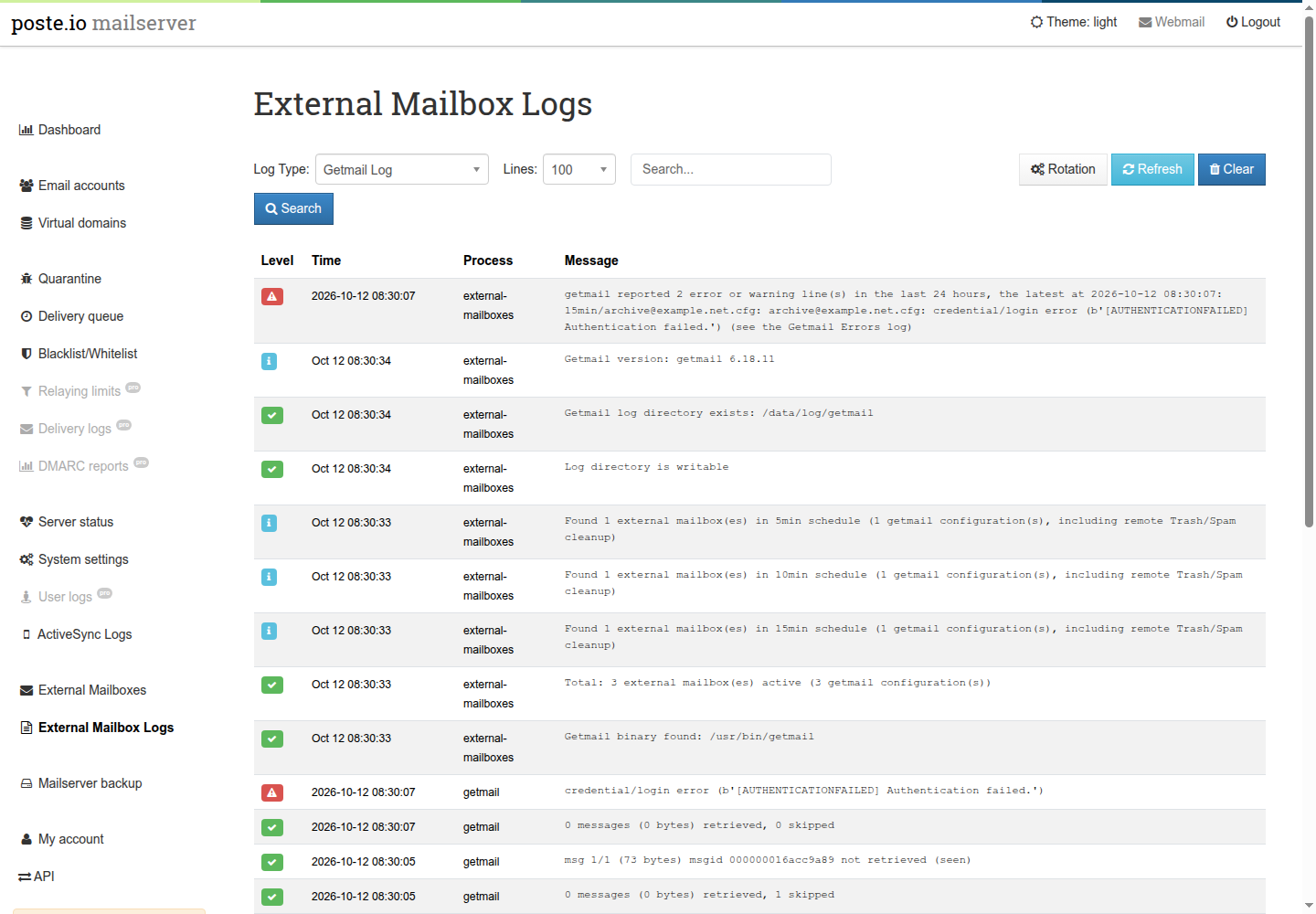
- Logs page: the getmail log, the getmail errors and the cron log, with
search, a line limit, auto-refresh and a status view (getmail version,
folders, number of external mailboxes per schedule). Clear empties the
getmail log or the getmail errors. Syslog and the mail log are offered only
if the admin can read them; on a standard Poste.io it cannot (
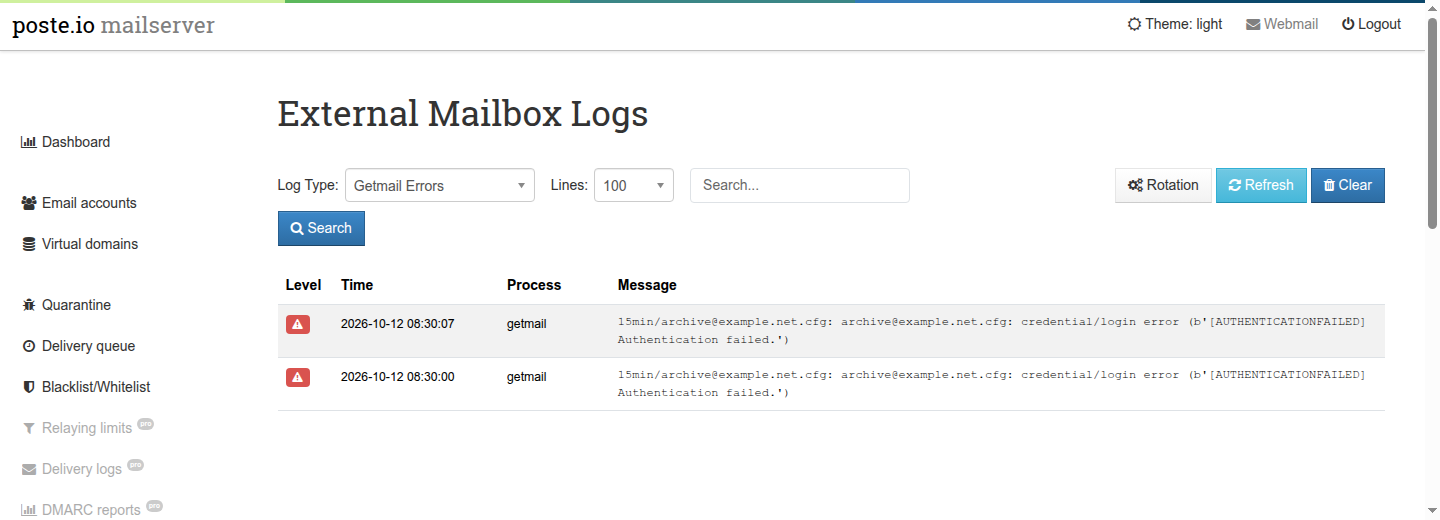
root:adm,0640), so they do not appear. - Getmail errors: what getmail reports (configuration errors, failed
logins, unreachable servers, crashes, warnings about the configuration) is
written by
cron.shto its own log, each line with the time and the mailbox file it belongs to, and shown as Getmail Errors in the logs page. When there are lines from the last 24 hours, the default getmail view says so in a red line on top (how many, and the latest). A separate file because the admin cannot read/data/log/mail.log(root:adm,0640), where they also go, and because some of them (a configuration getmail cannot read, a crash) never reach getmail's own log. - Log rotation:
getmail.loganderrors.logare rotated by Poste.io's nightly logrotate, with settings chosen in the logs page (Rotation button): rotation on or off, how often the getmail log is rotated (day, week, month), the size above which the getmail errors are rotated (512 KB to 10 MB) and how many old copies are kept, compressed (1 to 12). Defaults: weekly, 1 MB, 4 copies. The errors are rotated by size and not by date because the red line of the getmail view reads only the currenterrors.log. See How it works below. - Spam check (rspamd): every fetched message is scanned by rspamd before
delivery, by a getmail filter (
getmail-rspamd, in the image). It gets the sameX-Rspamd-Score,X-Rspamd-BarandX-Rspamd-Reportheaders as mail received over SMTP (existing ones are replaced, so they cannot be forged), and from the score at which Poste.io marks spam (munge_subjectin Haraka'squarantine_decide.ini, 6 by default) the*****SPAM*****subject prefix that the mailbox's sieve rule files into Junk. Above Poste.io's quarantine score the message goes to Junk too: nothing fetched is held back. Without the filter fetched mail is not scanned at all: getmail delivers through Haraka's local submission socket, where the rspamd plugin skips local connections (local_ip=false). The Bayes classifier learns into the bucket of the recipient's domain, like for SMTP mail. Limits: the message comes from a mailbox, not from an SMTP client, so the checks on the client's address and name do not apply (the one that would fire on every message, unknown hostname, is switched off), SPF cannot be checked, and DMARC relies on DKIM only (an unsigned message from a domain with arejectpolicy getsDMARC_POLICY_REJECT, +2). The remote provider checks SPF and DMARC with the real address when it receives the mail. If rspamd does not answer the message is delivered unchanged and the reason is written to the getmail errors (below): mail is never lost or delayed because of the filter. - Translations: English and Czech, like the rest of the Poste.io admin (the browser chooses).
The logs page: the default getmail view, with the red line on top when there are recent errors, and the Getmail Errors view (example data).
How it works
The "database" is the file system, inside the /data volume:
/data/var/getmail/
├── 5min/ 10min/ 15min/ 30min/ 60min/   one .cfg per mailbox; the folder is the schedule
├── disabled/                            mailboxes not scheduled
├── cron.sh                              the runner
└── <schedule>/oldmail-*                 getmail's memory of already fetched messages
/data/log/getmail/getmail.log            operational log (written by getmail)
/data/log/getmail/errors.log             what getmail reports as errors (written by cron.sh)
A mailbox with remote cleanup has up to three files in its folder:
user@example.com.cfg (download), user@example.com.trash.cfg and
user@example.com.spam.cfg (fetch → discard to /bin/true → delete on the
server). The cleanup files are not listed separately: they are created,
updated and removed together with their mailbox.
The crontab of the mail user (/etc/external-mailboxes.crontab) runs
cron.sh <folder> for each schedule; cron.sh runs getmail on each .cfg
with flock -n, so a slow mailbox never overlaps with itself. getmail never
runs as root. Each fetched message goes through the getmail-rspamd filter
(the [filter1] section of the .cfg) and is then delivered with Poste.io's
sendmail; what getmail prints as errors goes to errors.log.
Log rotation
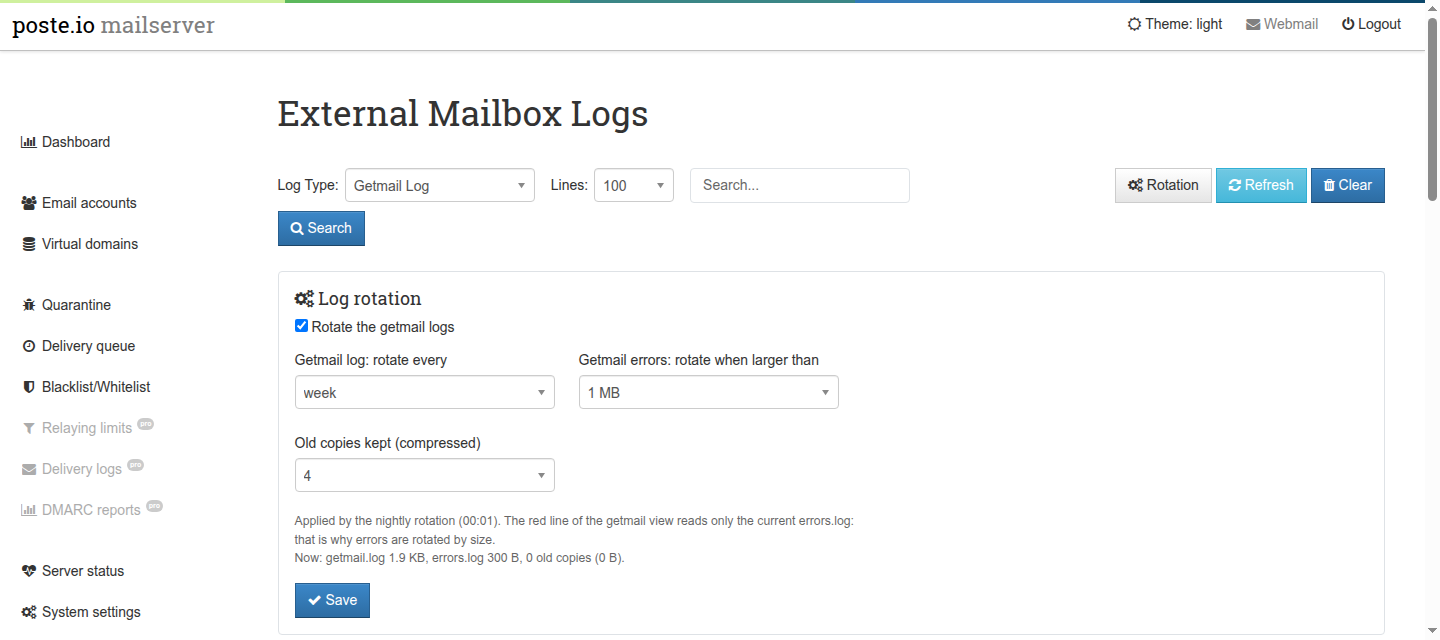
The admin runs as mail and cannot write logrotate rules, which must belong
to root. So the settings are saved in /data/var/getmail/log-rotation.ini
(on the volume: they survive rebuilds and upgrades), and a root script,
/usr/local/bin/external-mailboxes-logrotate, turns them into
/etc/logrotate.d/external-mailboxes every night at 00:00
(/etc/cron.d/external-mailboxes-logrotate), one minute before Poste.io's
logrotate. A change made in the admin applies from the next night. The image
contains the rule with the default settings, written by the same script at
build time.
The settings file is written by a less privileged user and read by root: the
script executes nothing from it, and accepts only the values offered by the
form (enabled 0/1, getmail_every daily/weekly/monthly, errors_size
512k/1M/5M/10M, keep 1/2/4/8/12); anything else means the default. The
admin checks the same values before saving (and its own CSRF token).
/data/var/getmail/log-rotation.ini          settings (admin, mail, 0640)
/usr/local/bin/external-mailboxes-logrotate writes the rule (root)
/etc/cron.d/external-mailboxes-logrotate    runs it at 00:00
/etc/logrotate.d/external-mailboxes         the rule, used by logrotate at 00:01
Security
- Files:
/data/var/getmailand/data/log/getmailbelong tomail:mail, folders0750,.cfgandoldmail-*files0600. The admin (php-fpm runs asmail) writes them, cron reads them asmail. - Passwords: getmail needs them in clear text in the
.cfgfiles, so they are stored there (readable only bymail). They are never sent back to the browser: when editing, an empty password field means "keep the saved one", and the saved password is read and rewritten untouched. - Saved password and the test buttons: with an empty password field, "Test connection" and "Load folders" use the saved password only if protocol, server, port and username are exactly the saved ones; otherwise they ask for it. Without this rule, changing the server in the form would be enough to send the saved password to any host.
- TLS: for the SSL protocols the generated configuration sets
ca_certs, so getmail verifies the server certificate and its name (without it getmail usesCERT_NONE). "Test connection" and "Load folders" verify it too. The non-SSL protocols are plain text, as their name says. - CSRF: Poste.io disables Symfony's form CSRF protection
(
fos_rest.yaml,disable_csrf_role: PUBLIC_ACCESS), so every form and AJAX call of the module carries its own explicit token, checked by the controller. - Validation: protocol, schedule and retention must be values offered by
the form; the email address becomes a file name and is checked against a
strict pattern (no
/, no..); the server name too; the destination must be an existing mailbox or redirect; values written into the.cfgfile cannot contain line breaks (they would inject configuration lines).
Notes and limitations
- Gmail / Microsoft 365: OAuth2 is not supported. Gmail accepts IMAP with an
app password (2-step verification required) using the IMAP SSL protocol and
imap.gmail.com; this was not tested by the author, use Test connection to check your account. Gmail folders are named like[Gmail]/Spam. - Multidrop (one catch-all remote mailbox sorted by original recipient) is not offered: to send one external mailbox to several people, deliver it to a redirect.
- POP3 test: c-client accepts neither half-open nor read-only POP3
sessions, so the test opens
INBOX; it closes without expunge, so no message is deleted. - The status lines of the logs page are log output and stay in English.