ActiveSync logs in the admin
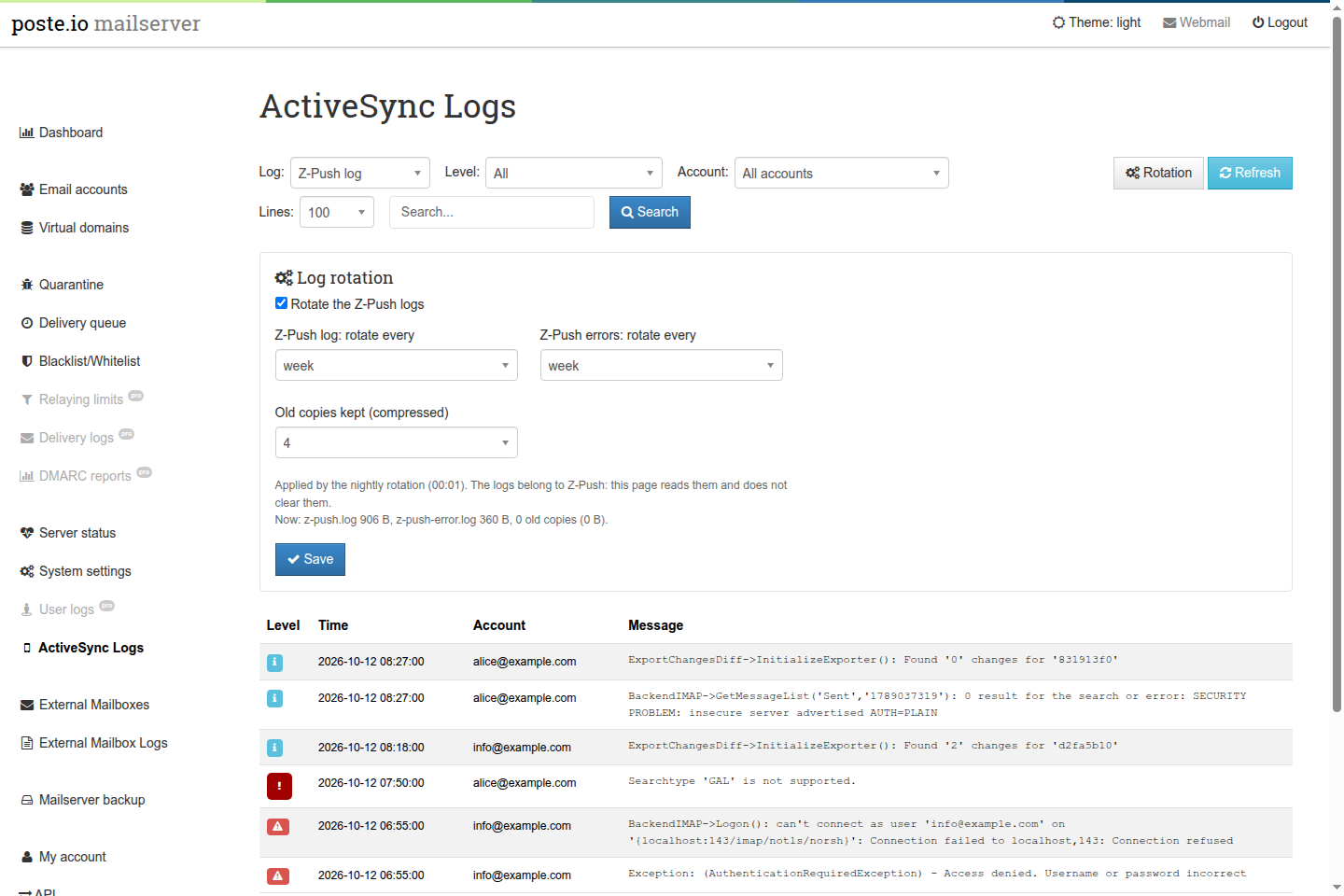
A page of the Poste.io admin, ActiveSync Logs, to read the logs of Z-Push
(the ActiveSync server phones talk to) and to set their rotation. Without it
these logs are only inside the container, and Poste.io never rotates them:
on a server with a couple of phones z-push.log grows by a few megabytes a
month, forever.
The add-on is independent of the others: Z-Push and its logs are part of every Poste.io, with or without calendars and contacts over ActiveSync.
The page
The entry is in the left menu right after User logs, for super admins only.
- Log:
z-push.log(everything Z-Push writes at its log level, INFO in Poste.io) orz-push-error.log(only its warnings and errors). - Level: all lines, warnings and errors, or errors only (Z-Push's
ERRORandFATAL). - Account: the accounts found in the last 20,000 lines of the log; pick one to see only its lines.
- Lines and Search (plain text, case-insensitive).
The filters apply to the whole file, then the last 25–500 matching lines are shown, newest first. Each line shows Z-Push's level (warnings yellow, errors red), the time, the account and the message; a message that Z-Push writes over two lines is shown as one. The page refreshes itself every 30 seconds.
What you typically find there: a phone with a wrong password
(AuthenticationRequiredException), a phone asking for something the server
does not offer (Searchtype 'GAL' is not supported), IMAP refusing Z-Push's
connection (mail server down), and at every sync the INFO line "SECURITY
PROBLEM: insecure server advertised AUTH=PLAIN": Z-Push talks to Poste.io's
IMAP on localhost without TLS, which is noise, not a risk from outside.
There is no Clear button, on purpose. The logs belong to Z-Push (user
www-data, mode 0644), and Poste.io gives them back to www-data at every
start; the admin runs as mail and can read them, not change them. Making
them writable by the admin would mean changing permissions that Poste.io sets.
The rotation keeps them small instead.
Log rotation
Rotation opens the settings: on/off, how often each log is rotated (every day, week or month), how many old copies are kept, compressed (1–12). The defaults are weekly for both and 4 copies. A line under the settings shows the current size of the two logs and of the old copies.
It works like the log rotation of External
Mailboxes. The admin runs as mail and
cannot write logrotate rules, which must belong to root, so:
- the admin saves the settings in
/data/var/activesync-logs/log-rotation.ini(on the volume: they survive rebuilds and upgrades), with its own CSRF token and only the values offered by the form; - a root script,
/usr/local/bin/activesync-logs-logrotate, turns them into/etc/logrotate.d/activesync-logsevery night at 00:00, one minute before Poste.io's logrotate, and at every container start. A change made in the admin applies from the next night.
The settings file is written by a less privileged user and read by root: the
script executes nothing from it and accepts only the allowed values
(enabled 0/1, zpush_every and errors_every daily/weekly/monthly, keep
1/2/4/8/12); anything else means the default.
The rule rotates the two logs as www-data (su www-data www-data) and
recreates them 0644 owned by www-data, as Poste.io has them. No
copytruncate is needed: Z-Push opens the file again for every line it
writes, so it continues in the new file at once.
/data/var/activesync-logs/log-rotation.ini   settings (admin, mail, 0640)
/usr/local/bin/activesync-logs-logrotate     writes the rule (root)
/etc/cron.d/activesync-logs-logrotate        runs it at 00:00
/etc/cont-init.d/90-activesync-logs.sh       at every start: the settings folder, then the rule
/etc/logrotate.d/activesync-logs             the rule, used by logrotate at 00:01
Existing installations
Nothing to do by hand. /data is a volume, so a folder prepared in the image
would be hidden on an installation that already has one; the settings folder
is therefore created at every container start by
/etc/cont-init.d/90-activesync-logs.sh (a start script run as root by the
image's init, after Poste.io's own), which also writes the rule: from the
first night the logs are rotated with the default settings, until they are
changed in the page.
Files
| File | Role |
|---|---|
activesync-logs/admin/src/Base/Controller/ActiveSyncLogsController.php |
the page and the saving of the settings |
activesync-logs/admin/templates/Base/ActiveSyncLogs/ |
the page and its table (the table is reloaded every 30 seconds) |
activesync-logs/activesync-logs.{en,cs}.yml |
translations |
activesync-logs/activesync-logs-logrotate + .cron |
the root script and its nightly run |
activesync-logs/90-activesync-logs.sh |
start script: settings folder and rule |
activesync-logs/activesync-logs-install.sh |
installs everything above and adds the menu entry |
activesync-logs-install.sh is the only part that touches a Poste.io file:
it adds three lines to the menu template right after User logs. It refuses
to run if it does not find that entry exactly once, followed by its </li>,
so a Poste.io update that changes the menu breaks the build instead of leaving
the page without its entry.
Removing it
Build without the section. What stays in the volume is
/data/var/activesync-logs (the settings) and, in /data/log/z-push, the old
copies made by the rotation (*.log.1, *.log.N.gz); remove them if you no
longer need them. The Z-Push logs themselves are Poste.io's and stay where
they were.